.svg)
Powered by Keepgo
Powered by Keepgo
Published on:
October 5, 2026
Tags:
eSIM
Plenty of businesses know about eSIMs. These digital cards install on your phone, work nearly instantly, save money on roaming, and provide extensive coverage. And although these are well-established facts, not everyone looks at them from a technical perspective or researches how they work.
In reality, eSIMs are a bit more complex than they may seem. There’s a lot more going on in the background, and it’s important to understand the technical underbelly, especially for becoming an eSIM reseller or a white-label MVNO. This is also nearly a requirement for providing proper support or committing to an API integration.
In this guide, we’re going to break down everything tech-related behind eSIMs: SM-DP+, SM-DS, eSIM profiles, how they are created and delivered, and explain why the tech behind eSIMs matters for business.
Let’s start from the beginning. Every eSIM is made of two parts: a chip and a profile, plus an ID number that ties them together.
When you or your customer installs an eSIM, the provider sends the profile over the internet fully encrypted, so that only the chip with a particular EID can open it. Once it's installed and switched on, the device can connect to the operator's network, usually without any extra setup.
As the last paragraph made clear, an eSIM doesn’t appear on the device by itself. In fact, several parties are involved, all according to GSMA specs. They perform the following roles:
Because GSMA sets telecom standards, they’re also an important part of the ecosystem. This organization represents the interests of 1,000+ mobile operators. It writes the industry rules and performs security checks. Although not strictly compulsory, their guidelines and policies regulate quality and indicate a stable, reliable telecom product if accredited and tested by the organization.
But ultimately, only the last row really matters for resellers or white-label MVNOs. You don’t operate this chain, and all of the components sit outside your direct oversight or responsibilities. Yet, this can help properly troubleshoot future issues.
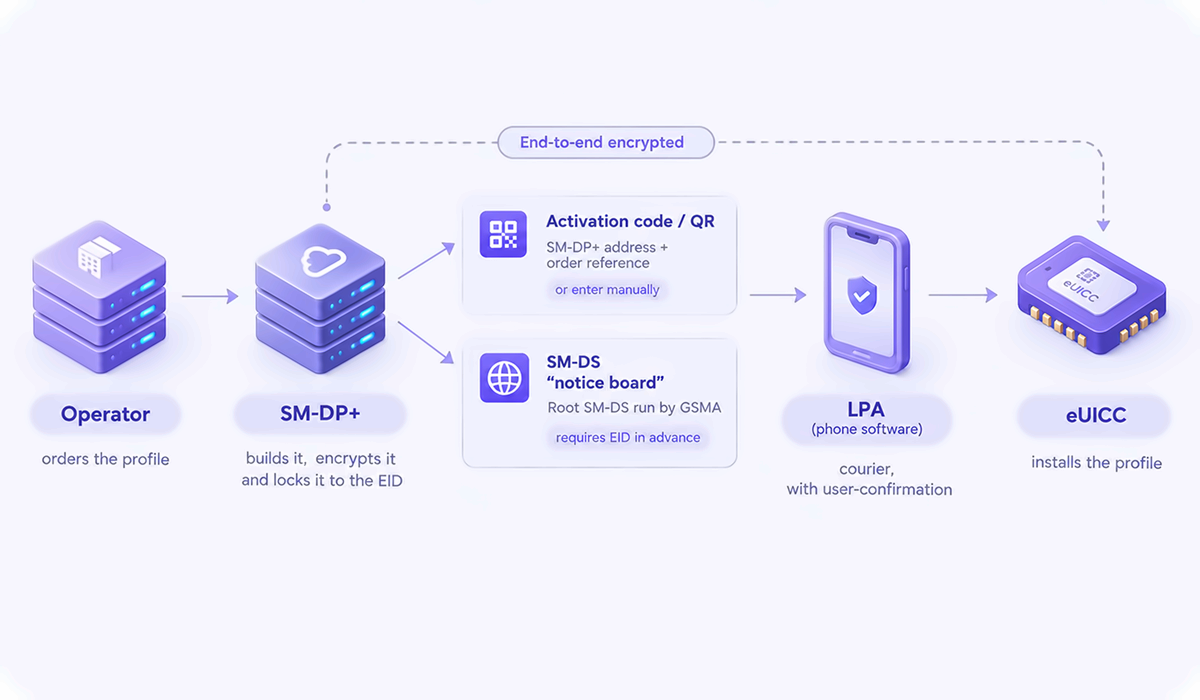
Subscription Manager - Data Preparation+ (SM-DP+) is the server that turns the operator’s plan into an eSIM profile and delivers it to the device. It generates, manages, and protects all profiles requested by the operator. It's run by the operator or by a specialist provider on its behalf.
When an order comes in, the SM-DP+ packages and encrypts the profile, then locks it to one chip using that chip's EID. The customer then gets an activation code, usually a QR code, containing the SM-DP+ address and a reference to their order. If the QR code won't scan, phones like the iPhone let users type the details in by hand. That's why "SM-DP+ address" is such a common support question.
Some profiles won’t even need the code at all, and that’s where Subscription Manager - Discovery Service (SM-DS) comes into play. It works like a notice board: the SM-DP+ posts a note saying a profile is waiting for a specific EID and where to collect it. If it finds one, it goes straight to that SM-DP+ to download the profile, and the user still has to confirm before anything installs.
There’s one central Root SM-DS, managed by GSMA. Operators can also run their own SM-DS, which passes the notes to the root. The catch is that the operator has to know the device's EID in advance. That's why this route is typically used when a device is sold together with its plan.
The Local Profile Assistant (LPA) is the eSIM software that connects the phone to the rest of the eSIM system. Each device maker builds it themselves, and that’s why adding an eSIM looks slightly different on an iPhone than on a Samsung or Pixel. It runs either on the eUICC chip or the phone’s operating system.
The LPA has three jobs:
After a profile is enabled, disabled, or deleted, the LPA can notify the operator, so the provider's systems stay in step with the phone.
For resellers, the practical point is to always give customers both a QR code and the manual details, because they work on every phone. App-based installs and one-tap activation depend on the platform and on carrier support. Apple's own troubleshooting asks for the device's IMEI or EID, so ask for them early in a support ticket too.
Now that we’ve discussed the important profile delivery elements, let’s recontextualize how the customers get them. There’re six distinct steps involved:
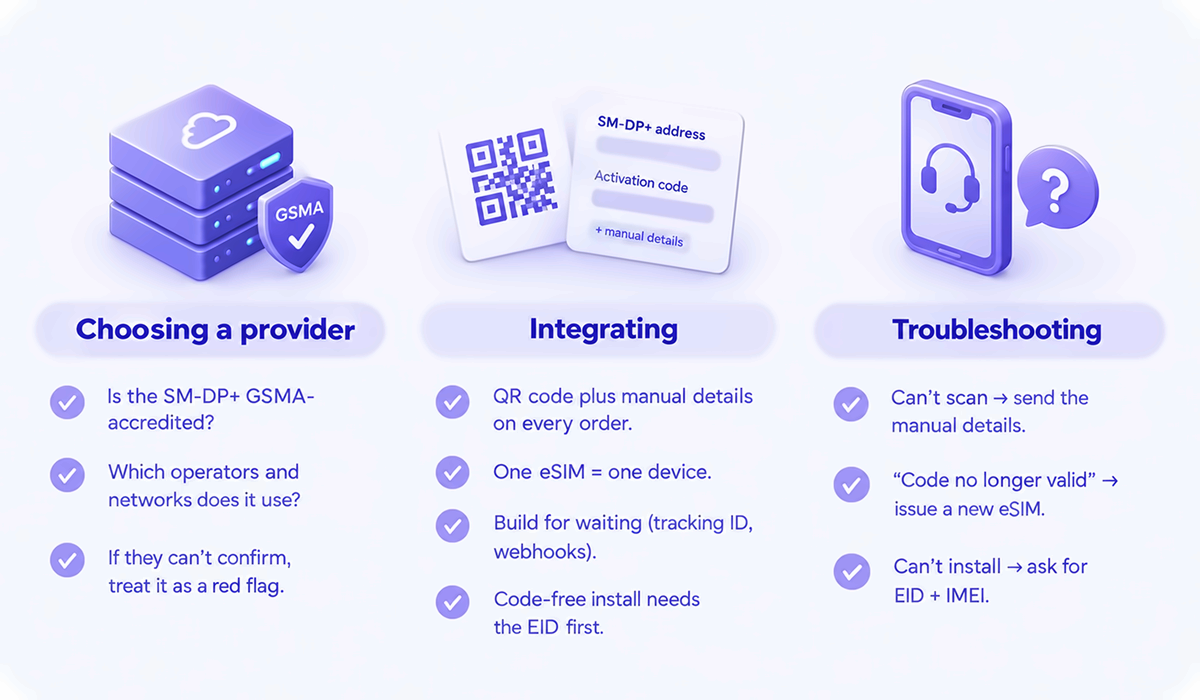
Although you won’t run your own SM-DP+ or build an LPA as a partner, understanding how these things work lets you control three things: which provider you pick, how you integrate, and how you support your customers.
As you’ll be relying on someone else’s infrastructure, it’s only fair you ask about it. Inquire whether the provider’s SM-DP+ was accredited by GSMA. Ask about which operators they work with and to which networks their profiles connect. If you can’t confirm anything with the provider, it indicates poor service quality.
If you’re going to use the API to build connectivity into an app or create a webstore, a few things will require your attention:
The last step is support, and a lot can go wrong here. A common issue is when an LPA can’t read the activation code and customers can’t install the eSIM, but because you know about SM-DP+, you’ve already accounted for that during integration. If you encounter another error like “This code is no longer valid”, the eSIM was bound to the device, and you know you should issue a new one.
If the customer can’t install an eSIM at all, you know that means the phone doesn’t support it or has no internet connection. You’ll ask for the EID and IMEI, and troubleshoot accordingly. The list goes on, but the main point is that you’ll be able to handle these issues quickly and leave customers satisfied with the quality of support.
We are glad we could make things simpler and help you understand how eSIMs truly work without getting too technical. Content is only one way we share such information, and we’ve got plenty of training materials and guidance to offer for partners at esimba.ai.
If you’re interested in making ancillary revenue through eSIMs or focusing your entire business around connectivity, we’re here to help. We vet all new partners, assign account managers, and ensure they’re fully informed before operations begin. If you need development services or want someone to help with support, our teams are always available. Plus, you’ll get even more content like this over the coming months.
If you want a reliable partner with 15+ years of industry experience to guide you through the entire process, contact us today by clicking the button below.
.svg)
As a global MVNO, esimba.ai, a subsidiary of Keepgo, provides you with the opportunity to offer your customers top-quality connectivity in 150+ countries.
.svg)


